 DASH:Gen
What you get
A ZIP in Apache Superset's own export format (version 6): the dataset definition with its metrics, one YAML per chart, and the dashboard with its layout and filters. You import it through Settings → Import dashboards and point the dataset at your database connection.
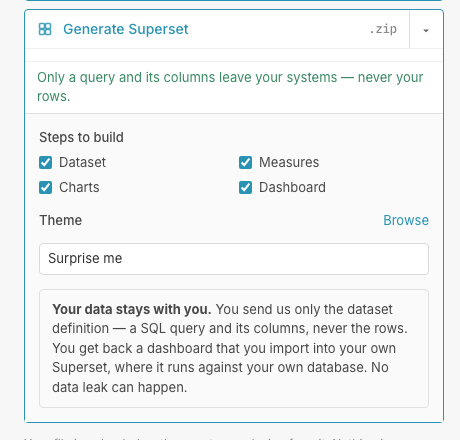
No API token, no admin access, nothing running against your Apache Superset instance. The platform never talks to Apache Superset at all — it writes the file, and you import it when you choose.
How it works
- Upload a dataset, or an existing Apache Superset export ZIP if you want to keep part of what you already have.
- Choose which stages to regenerate. Dataset, measures, charts and dashboard are separate: an unselected stage is carried over from the export you uploaded instead of being designed again.
- Pick a theme from forty, or write your own CSS theme in the library.
- Download, and import it in Apache Superset.
Look at it before you import
After a run you can see the dashboard the agents designed, switch a chart's type, or pin one of your Handlebars chart templates to it, and download again. None of that runs an agent, so none of it is charged.
Your own chart templates
Apache Superset's Handlebars plugin lets a chart be arbitrary markup. You can keep ten templates of your own, private until you publish them, and pin one to any chart. A published template keeps working in every dashboard that already pinned it, even if you later make it private again.
What it costs: see the price list. One Apache Superset dashboard a day, from one data file, needs no account; the bundle expects a database you have connected.
Questions
Does DASH:Gen connect to my Apache Superset?
Never. It writes the export ZIP, and you import it through Settings, Import dashboards, when you choose. No API token and no admin access are involved.
Can DASH:Gen keep part of an Apache Superset export I already have?
Yes. In DASH:Gen, dataset, measures, charts and dashboard are separate steps, and a step you leave unticked is carried over from the export you uploaded instead of being designed again.
Can I try the DASH:Gen Superset generator without an account?
One Apache Superset dashboard a day, built from one data file, needs no account. Uploading a dataset export as the source, and the preview before download, come with an account; see the guide.