 DASH:Gen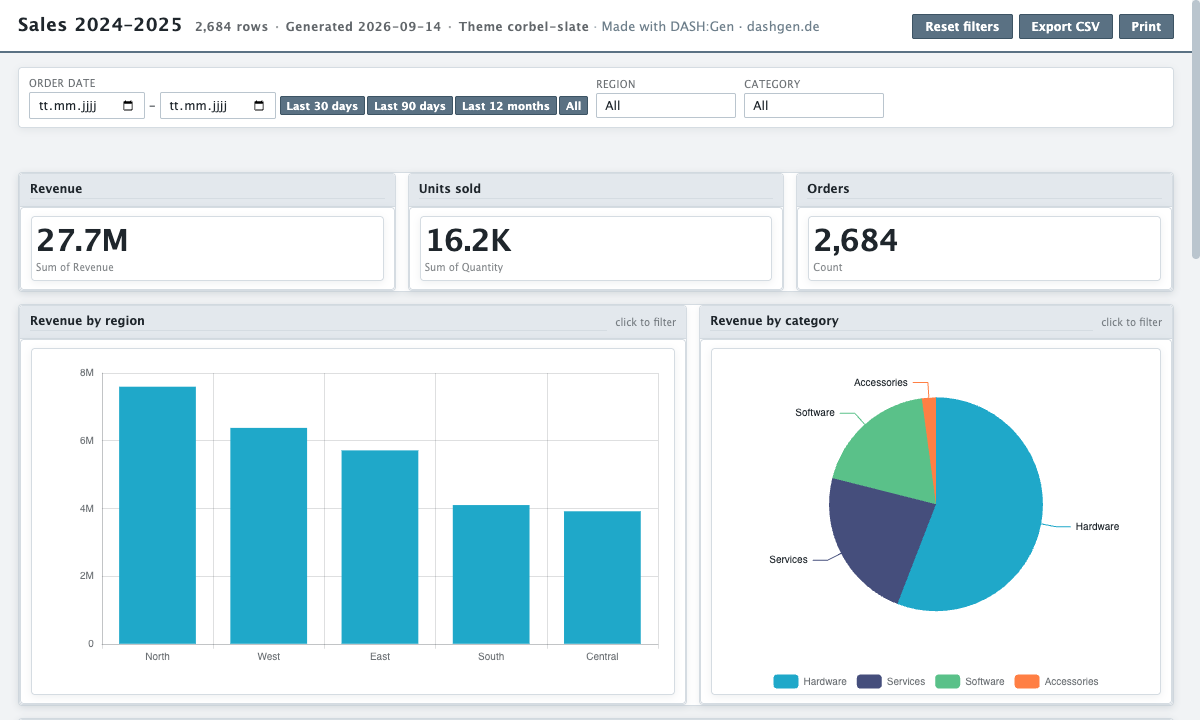
The file is a typical order export: one row per order line, with the date, where it was sold, what was sold, and the amounts. The dashboard answers the questions a sales lead asks first: how much, where, of what, and is it going up.
What the dashboard shows
- Three tiles: revenue, units sold and the number of orders.
- Revenue by region as bars and by category as a pie. Click a region and every other chart narrows to it.
- Revenue over time, which you can bucket by day, week, month, quarter or year.
- Revenue by product, and the full order table with search, sorting and CSV export.
The filter bar at the top holds a date range and the two dimensions most charts use. How the file is built, and what else it can hold, is in the HTML dashboard documentation.
Get it as Power BI or Apache Superset
The same CSV makes a Power BI project with the model and DAX measures built, or an Apache Superset bundle to import into your own instance. Both are built from the file you upload, not from this example.
Columns you need
| Column | Type | Example value |
|---|---|---|
order_date | date | 2024-01-01 |
region | text | South |
category | text | Software |
product | text | Analytics suite |
quantity | number | 5 |
revenue | number | 11013.64 |
cost | number | 8351.03 |
Download the sample CSV
The file this dashboard was built from, 2,684 rows. Drop it into the window to build your own version. sales.csv
The brief to start from
Revenue and units by region and category, the monthly trend, and the strongest products.
Pick this sample in the window and this sentence is filled in for you. The agents design their own dashboard from it, so yours will differ in its details from the one above, which was assembled from the same file on the runtime every generated dashboard uses.
Questions
Can DASH:Gen build this sales dashboard from my own export?
Yes. Any CSV or spreadsheet with a date, a few categories and an amount works; the column names do not have to match these. Drop it into the window and describe what you want to see.
Why does the dashboard show a total of orders without an orders column?
The Orders tile counts rows. Each row of the file is one order line, so counting rows counts them.
Does the dashboard need the internet to work?
No. The file carries its rows and draws every chart in the browser, so it works offline once downloaded.
Try it without an account
Three HTML dashboards, one Power BI report and one Apache Superset bundle a day need no sign-up and no card. No file to hand? Pick Sales under the drop zone.
Open this sample in DASH:Gen