 DASH:Gen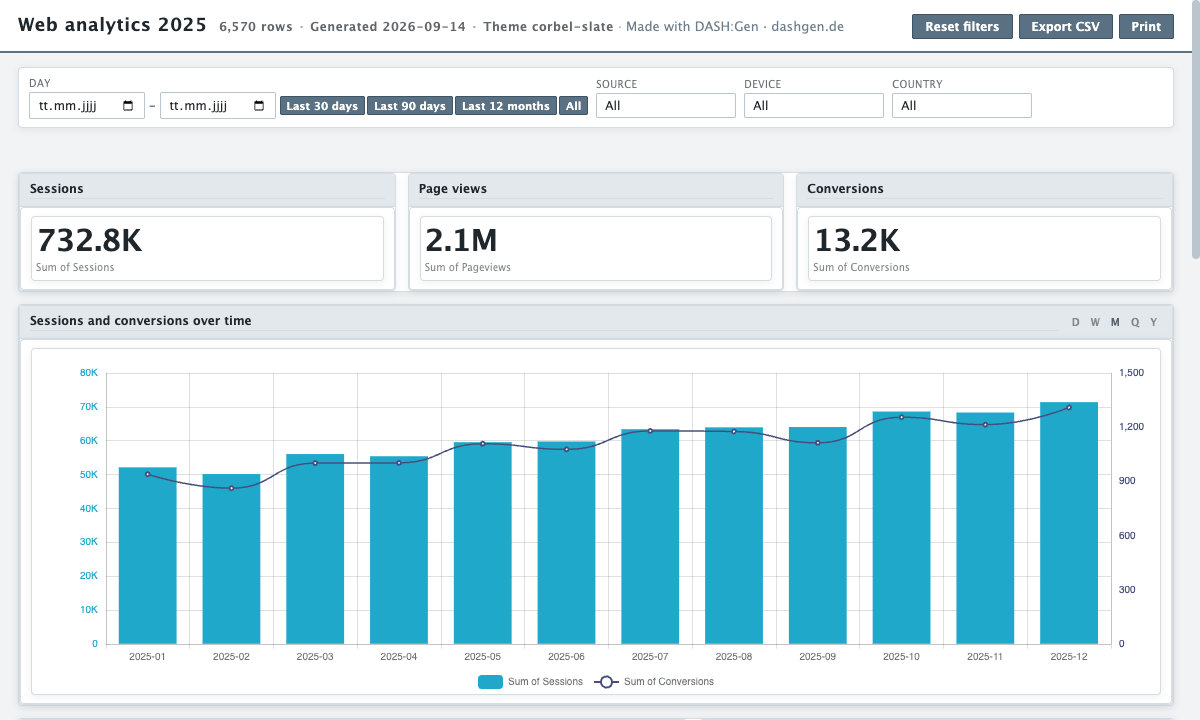
This sample is shaped like a daily export from a web analytics tool: one row per day, source, device and country, with the counts beside them. It has no personal data, only totals.
What the dashboard shows
- Three tiles: sessions, page views and conversions.
- Sessions and conversions over time on two axes, so the smaller series stays readable.
- Sessions and conversions by traffic source, sessions by device, and conversions by country.
- The day-by-day table at the foot, searchable and exportable as CSV.
Every chart filters the others: click Paid search and the trend, the device split and the country bars all narrow to paid traffic.
Get it as Power BI or Apache Superset
The same export makes a Power BI project you open in Desktop, or an Apache Superset bundle. The steps for a CSV are in the CSV guide.
Columns you need
| Column | Type | Example value |
|---|---|---|
day | date | 2025-01-01 |
source | text | Organic search |
device | text | Desktop |
country | text | Netherlands |
sessions | number | 233 |
pageviews | number | 868 |
conversions | number | 5 |
Download the sample CSV
The file this dashboard was built from, 6,570 rows. Drop it into the window to build your own version. web-analytics.csv
The brief to start from
Sessions and conversions by source and device, with the trend by week and by country.
Pick this sample in the window and this sentence is filled in for you. The agents design their own dashboard from it, so yours will differ in its details from the one above, which was assembled from the same file on the runtime every generated dashboard uses.
Questions
Can DASH:Gen build a dashboard from a GA4 or other analytics export?
Yes, if it is a file: a CSV, a spreadsheet or JSON with a date column and the counts you care about. DASH:Gen does not connect to an analytics account; you export, then upload.
Why are sessions and conversions on two axes?
They differ by two orders of magnitude. On one axis the conversions would be a flat line at the bottom; the second axis keeps both readable.
What happens to IP addresses in a web log?
A column of client addresses can be looked up against a server-side table to add country and city before the agents see the file; see reference tables.
Try it without an account
Three HTML dashboards, one Power BI report and one Apache Superset bundle a day need no sign-up and no card. No file to hand? Pick Sales under the drop zone.
Open this sample in DASH:Gen