 DASH:Gen
What you get
A Power BI project (.pbip) by default, or a template (.pbit).
Inside are the Power Query steps that load the data, a model with its relationships worked
out, DAX measures for what is worth measuring, and report pages laid out in one of twenty
themes. It is an ordinary project, editable in every part.
Never a .pbix: that format keeps its model in a binary part only Power BI
Desktop can write. You open the project in Desktop and save it there, and from then on it is
a .pbix like any other.
Which sheet, which header row
.xlsx, .xlsm and .xls are read directly. Hidden sheets
are skipped; of the visible ones, the sheet with the most data rows under a header is
read. The header is the first row, within the first twenty, that has at least two filled
cells and a row under it — so a title line or a blank spacer at the top is passed over.
If another sheet wins than the one you meant, save that sheet as its own workbook.
| In the cell | Reaches the report as |
|---|---|
| A formula | Its calculated result, never the formula text. An error such as #DIV/0! is blank. |
| A date | 2025-03-31, with the time when the cell format has one. |
| A number shown as a plain number | As shown, which keeps 0000123 an identifier. |
| A percentage or currency | The underlying value: 12.5% is 0.125. |
Step by step
- Open dashgen.de and drop the workbook in. It is read before anything runs, and the columns and first rows are shown.
- Describe the report in a sentence: which figures, broken down by what, over which period.
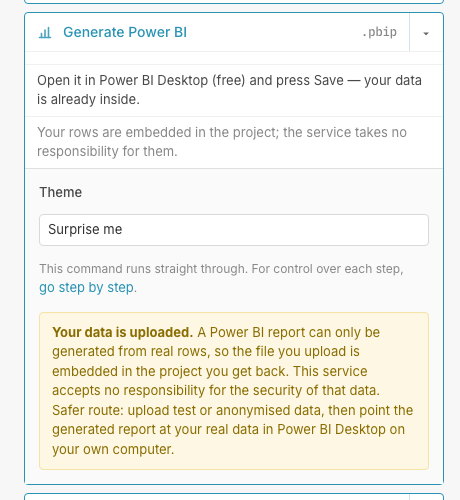
- Open the settings of Generate Power BI and choose a theme, or leave Surprise me.
- Press Generate Power BI, then download the result.
- Unzip it, open the
.pbipin Power BI Desktop — the free download from Microsoft — and press Save.
Where your rows end up
Embedded, without an account and on the free plan: one sheet is rendered to text and carried inside the project, so the report opens with its data and needs no source file. That is also why the file has to fit a smaller size limit there.
Linked, on a paid plan: the uploaded files travel beside the project and a
SourceFolder parameter points Power Query at them. Drop in a newer export with
the same name and press Refresh. An .ods can be embedded but not linked, because
Power Query has no reader for it — save it as .xlsx for a linked report.
Step by step, stage by stage
With an account the report can also be built in four stages — Power Query, model, measures, report — each shown before the next. The first two run no agent at all. Running a stage again clears the ones after it, so measures are never left written against a model you have since changed.
Questions
Which sheet of an Excel workbook does DASH:Gen read?
DASH:Gen skips hidden sheets; of the visible ones, the sheet with the most data rows under a header. If another sheet wins than the one you meant, save that sheet as its own workbook.
What does DASH:Gen do with Excel formulas?
The report receives each formula’s calculated result, never the formula text. An error such as #DIV/0! becomes blank.
Does the Power BI project from DASH:Gen contain the data or link to it?
Without an account and on the free plan one sheet is embedded in the project. On a paid plan the files travel beside it and Power Query reads them, so a newer export with the same name refreshes the report.
Try it without an account
Three HTML dashboards, one Power BI report and one Apache Superset bundle a day need no sign-up and no card. No file to hand? Pick Sales under the drop zone.
Open DASH:Gen